
Zum Inhalt springen

enaio lumee: the AI assistant that answers from your documents

enaio lumee is the AI assistant inside the DMS. Users ask questions about documents and receive answers, summaries and comparisons with a source reference, instead of working through long lists of hits.

Anyone looking for information wants an answer, not a list of hits. enaio lumee reads the documents you are permitted to see, answers the question in natural language and points to the relevant passage. Searching becomes asking, and hours become seconds.

AWP Consult does not introduce enaio lumee as a technical gimmick, but along your documents, roles and processes. We define which files the assistant may access, how access rights remain protected and which language model is used. In this way a chat window becomes a reliable tool in day to day work.

250+completed projects since 2006150+reference clients in the DACH region12 to 18months average payback period
Ask enaio lumeeSample dialogue
You

Summarise the framework agreement with Meffert AG in English.

lumee
Source: Framework agreement Meffert AG, page 3

The key points at a glance

01

enaio lumee is an AI assistant for enaio that answers questions about documents, summarises content and compares documents with one another.

02

Instead of delivering a list of hits, lumee gives a formulated answer and points to the source from which the answer is drawn.

03

lumee respects all access rights. Users see and receive answers only from documents they are permitted to access.

04

The assistant works multilingually. For example, it summarises a German contract in English or answers questions in several languages.

05

The choice of language model remains open, either in the cloud or in an environment in which the documents never leave your premises.

06

AWP Consult sets lumee up around your real files and roles, from the connection through to secure operation.

Would you like to see this with your own documents?

Request a live demo +49 6104 94738-13

What is enaio lumee?

enaio lumee is the AI assistant within document management. It understands a user's question, searches the documents released for that purpose and formulates an answer from them. Unlike a classic search, lumee does not deliver ten possible documents, but the statement you need, with a reference to the relevant passage.

01

Answering questions

Users ask a question in natural language. lumee reads the permitted documents and answers with reference to the specific source.

02

Summarising

Long contracts, reports or project files are condensed to the essentials, in another language if required.

03

Comparing

Several documents can be set side by side, for example two contract versions or quotations, to make differences visible.

04

Protecting rights

Every answer is created solely from documents the user is permitted to access. The access rights from enaio apply unchanged.

Experience enaio lumee with your documents

We show you, using your real files, how lumee answers questions, summarises and compares, and how access rights remain protected throughout.

What enaio lumee looks like in practice

Two everyday examples show how users work with enaio lumee. In both cases a user asks a question, and the assistant delivers a structured answer with reference to the underlying documents.

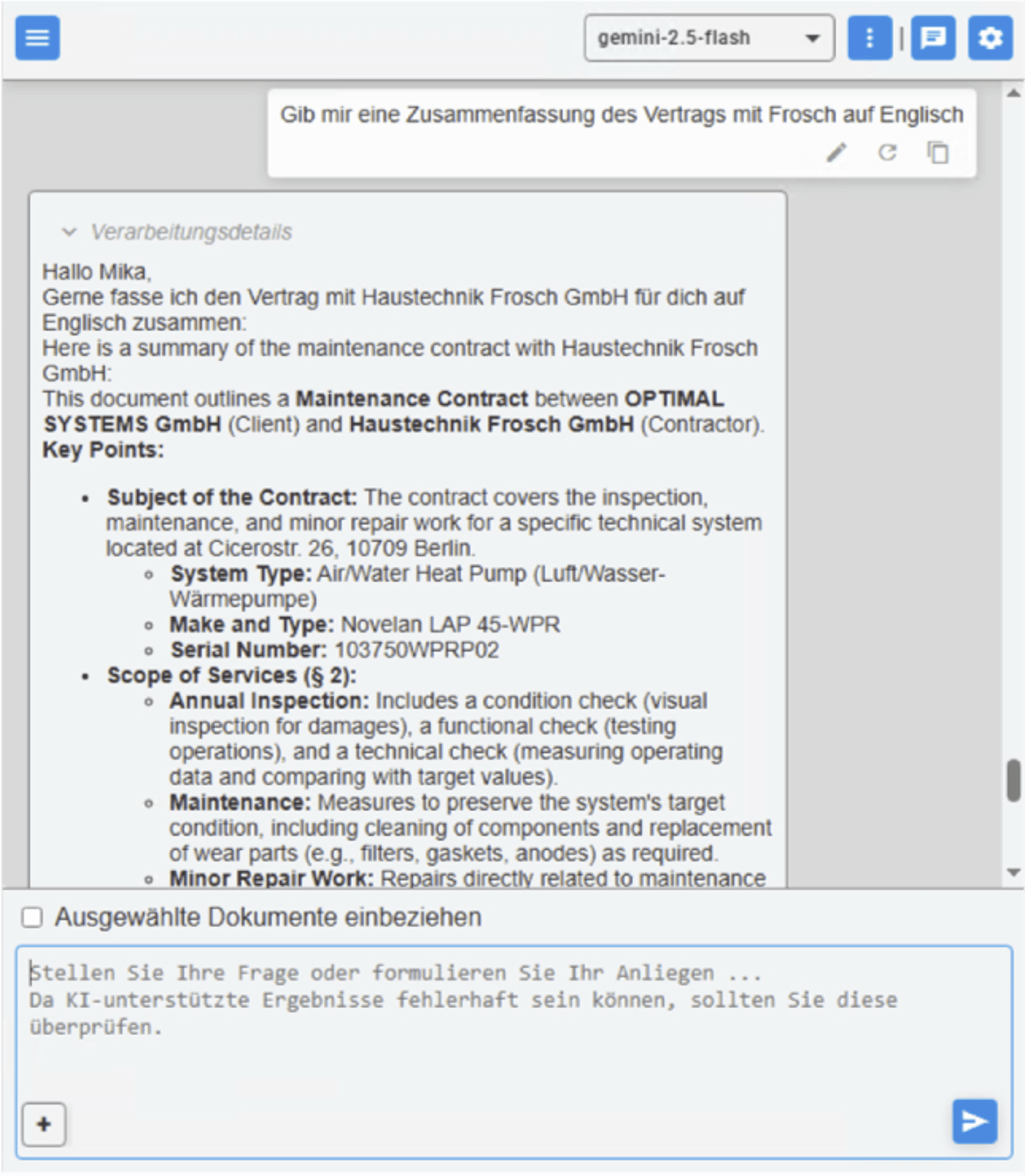
enaio lumee summarises a contract in English

Request to summarise a contract in English

With enaio lumee you can have extensive contracts summarised automatically in English. The AI analyses the full contract content, identifies the key provisions, obligations, deadlines and terms, and produces a precise, clear summary from them. This gives you a structured overview quickly, ideal for international coordination, management reports or sharing with English speaking business partners.

  • Automatic English summary of complex contract content
  • Structured presentation of obligations, deadlines and terms
  • Ideal for international coordination and management reports
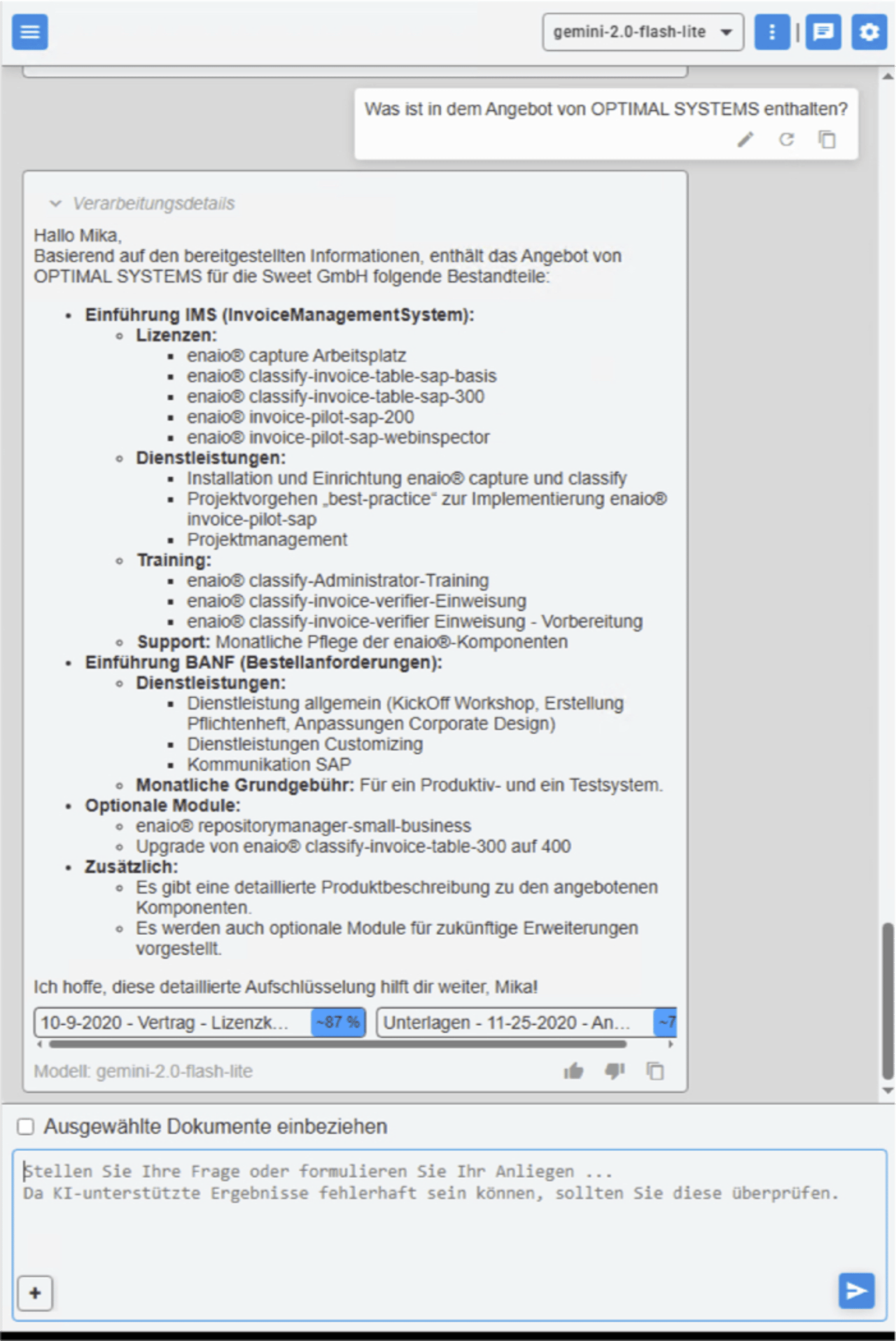
enaio lumee answers questions about the details of a customer order quotation

Request for quotation details on a customer order

With enaio lumee you can ask specific questions about the details of a particular customer order, for example about the modules included, the services agreed, training or individual options. The AI automatically analyses the relevant quotation documents, emails and attachments and delivers structured, clear answers with reference to the corresponding sources. In this way you gain clarity on all quotation content within a few seconds, without having to search or compare documents manually.

  • Fast analysis of quotation documents, emails and attachments
  • Precise answers on modules, services and terms with a source reference
  • Clearly reduced search and coordination effort in day to day work

Do you have a specific question about your case?

How does enaio lumee answer a question?

enaio lumee answers a question in four steps: understand the question, search the permitted documents, formulate the answer and indicate the source. The access rights take effect at every step, not only at the end.

01

Understand the question

The user asks their question in natural language. lumee grasps what it is about and which documents are relevant to it.

02

Search the permitted documents

The assistant searches only the documents the user is permitted to access. Restricted files remain invisible.

03

Formulate the answer

From the content found, lumee formulates a clear answer, summarises or sets differences side by side.

04

Indicate the source

Every answer points to the document and the passage from which it is drawn. This keeps it clear what the statement is based on.

What would that look like with your files? In a workshop we show enaio lumee using your real documents.

Arrange a consultation

Classic search or AI assistant, where is the difference?

The classic full text search finds documents that contain certain words. The work of opening the right document, finding the relevant passage and formulating the statement remains with the user. enaio lumee takes on exactly this work and delivers the answer instead of the list of hits. The following comparison shows the differences at the points that cost the most time in everyday work.

Criterion Classic search enaio lumee
Result List of possible documents Formulated answer with a source reference
Summarising By hand, document by document Automatic, in another language if required
Comparing Manual side by side comparison Differences are named
Language Search terms have to match Question in natural language, multilingual
Access rights Apply to the list of hits Apply to every individual answer

enaio lumee complements enaio, it does not replace your existing filing and search.

We show you what this looks like with enaio at your organisation.

Arrange an appointment +49 6104 94738-13

How does AWP Consult introduce enaio lumee?

AWP Consult introduces enaio lumee by defining the use case, establishing access to the right files, protecting the access rights throughout, choosing the appropriate language model and supporting operation. In this way an AI assistant becomes a reliable part of your daily work.

Tailoring enaio lumee to your processes

We define which files the assistant accesses, how the rights take effect and which language model is appropriate.

Arrange a consultation +49 6104 94738-13
01

Access rights and data protection

An AI assistant in the DMS can only be used if it respects the rights just as strictly as the system itself. With enaio lumee this applies at every step:

The principles for data protection compliant document management apply unchanged. More on this on the page about document management under the GDPR.

  • Rights from enaio lumee uses the existing roles and rights. No one gains access through the assistant to documents that are otherwise denied to them.
  • Answer, not a detourThe answer too is created only from permitted documents. Restricted content does not appear in any summary.
  • TraceabilityThe source reference shows which document the statement is drawn from, so that every answer remains verifiable.
Practical tip

Start with a clearly defined set of files, for example contracts from a single area. In this way lumee shows its effect early, before you release further files.

02

Choice of language model

enaio lumee does not tie you to a single language model. Which one is appropriate depends on data protection, languages and internal requirements:

Where else AI eases the load in document management is shown on the page about artificial intelligence in the DMS.

  • Operation as requiredThe model can run in the cloud or in an environment in which documents and queries never leave your premises.
  • MultilingualismQuestions and answers are possible in several languages, for example an English summary of a German contract.
  • Open choiceThe choice of model remains open, so that you can respond to new developments without changing the assistant.
03

Connection to enaio and your files

enaio lumee delivers its value in interplay with your existing files and processes:

How documents arrive in enaio classified and indexed is described on the page about enaio kairos.

  • enaio as the foundationThe assistant accesses the documents in enaio without content having to be copied into a further system.
  • Structured filingThe cleaner files and metadata are maintained, the more accurately lumee finds and answers.
  • Embedding in daily workThe assistant is made available where work is done, so that questions can be asked without a detour.
04

Limits, verification and trust

An AI assistant is a tool, not a final authority. What matters is that the answers remain verifiable and that users know what they can rely on.

In this way enaio lumee becomes an assistant that users trust, because they can trace every statement. AWP Consult supports this path and brings in the experience from comparable enaio projects, so that you do not start from scratch.

  • Source referenceBecause every answer points to its source passage, it can be read and confirmed in the original document.
  • Verification where it mattersFor legally or financially significant statements, a look into the original document remains part of the process.
  • Step by step expansionTrust grows with use. Begin with use cases whose benefit is quickly visible.
Practical tip

Set fixed points in time at which you review the quality of the answers together. What is visible is improved in a targeted way.

Would you rather clarify this in person than read on?

Request a call back +49 6104 94738-13

What does enaio lumee work together with?

enaio lumee is designed as an assistant for enaio and fits into your existing environment. This creates a continuous path from the question to the substantiated answer, without documents leaving the system or having to be searched by hand.

enaio

The shared foundation for filing, rights and the assistant's access.

Solutions with enaio

Full text search

The existing search remains in place, lumee builds on it with formulated answers.

Workflow management

enaio kairos

Classified and indexed documents improve the foundation for good answers.

enaio kairos

Roles and rights

The permissions from enaio take effect unchanged for every answer from the assistant.

Security

What mistakes happen with AI assistants in document­management?

The most common mistakes when using an AI assistant are excessive expectations, too broad a start, neglected access rights, missing source references and a poorly maintained set of files. None of these is down to the AI, all can be avoided in the concept.

Expecting everything at once

Consequence
The assistant is measured against too many topics and disappoints.
Better
Start with clearly defined use cases whose benefit is quickly visible.

Not checking access rights

Consequence
An assistant that bypasses rights is a security risk.
Better
Enforce the rights from enaio consistently and check them before the start.

Working without a source reference

Consequence
Answers without evidence cannot be verified.
Better
Work only with a source reference, so that every statement remains traceable.

Neglecting the set of files

Consequence
Inaccurate answers arise from untidy files.
Better
Maintain filing and metadata before the assistant is rolled out broadly.

Omitting verification where it matters

Consequence
Significant decisions rest on the AI alone.
Better
For legally or financially important statements, consult the original document.

Not bringing users along

Consequence
The assistant is not used because no one knows it.
Better
Involve the departments early and show, using real questions, what lumee can do.
Try enaio lumee on your files

We show you, using your real documents, how lumee answers questions, summarises and compares, and how the rights remain protected throughout.

  • Answers with a source reference
  • All access rights protected
  • Multilingual and model open
Conclusion

From searching to asking

enaio lumee answers questions about your documents, summarises and compares, each time with a reference to the source and respecting all access rights. In this way long lists of hits become a concrete answer, and hours become seconds. What matters is that every answer remains traceable and permitted.

  • Answers in natural language instead of long lists of hits
  • Summarising and comparing, multilingual too
  • Every answer with a reference to the source
  • All access rights from enaio remain protected
  • Adapted by AWP Consult to your files and roles

Which terms around AI assistants should you know?

The most important terms that come up again and again in projects around enaio lumee.

AI assistant
A program that understands questions in natural language and produces a formulated answer from documents.
Language model
The AI model that understands language and formulates answers. With enaio lumee it can be chosen freely.
Source reference
The reference of an answer to the document and the passage from which it is drawn.
Summary
The condensing of a long document to its essential statements, in another language if required.
Access rights
The rules governing which person may see which documents. They apply to every answer from the assistant.
Full text search
The finding of documents based on the words they contain, the foundation on which an assistant builds.
Multilingualism
The ability to process questions and answers in several languages.
Large language models
Models trained on very large amounts of text that process natural language.
On-Premise
Operation in your own environment, in which documents and queries do not leave your premises.
Text recognition
The conversion from image to text, the basis for reading scanned documents.

Unsure where to begin? We assess your starting position.

Sources and legal bases

The factual and legal statements on this page are based on these sources. As of November 2026.

Frequently asked questions about enaio lumee

What is enaio lumee?

enaio lumee is an AI assistant for enaio. Users ask questions about their documents and receive answers, summaries or comparisons in natural language, each time with a reference to the source and respecting all access rights.

How does lumee differ from the normal search?

The classic search delivers a list of possible documents. enaio lumee delivers the answer itself and points to the passage from which it is drawn. The reading, summarising and comparing is handled by the assistant.

Does lumee respect the access rights?

Yes. enaio lumee uses the roles and rights from enaio. Every answer is created solely from documents the respective user is permitted to access. Restricted content does not appear in any answer.

Can lumee summarise documents in other languages?

Yes. enaio lumee works multilingually. It can, for example, summarise a German contract in English or answer questions in several languages.

Which language model does lumee use?

The choice of language model remains open. It can run in the cloud or in an environment in which documents and queries never leave your premises. Which model is appropriate depends on data protection, languages and internal requirements.

How do I know that an answer is correct?

Every answer from enaio lumee points to the document and the passage from which it is drawn. In this way the statement can be read and confirmed in the original document. For important decisions, a look into the original remains part of the process.

Do I need enaio in order to use lumee?

Yes. enaio lumee is designed as an assistant for enaio. It accesses the documents and the rights in enaio, without content having to be copied into a further system.

Do our documents remain confidential?

When operated in your own environment, documents and queries never leave your premises. Regardless of the mode of operation, the principles of data protection compliant document management apply, which we implement together with you.

What else can lumee do besides answering?

In addition to answering questions, enaio lumee can summarise documents and compare several documents, for example two contract versions or quotations, and name the differences.

How does AWP Consult introduce enaio lumee?

AWP Consult defines the use case together with you, establishes access to the right files, protects the access rights throughout, chooses an appropriate language model and supports operation. It makes sense to start with a clearly defined set of files.

Does this sound right for your company? Let us talk about it.

Request a consultation +49 6104 94738-13

Experience enaio lumee with your documents

In a workshop we show enaio lumee using your real files. You see how the assistant answers questions, summarises contracts and compares documents, how the access rights remain protected throughout and which language model suits your requirements. You experience the result with your own documents, not with a demo using sample data.

  • Tested on your real files
  • All access rights protected
  • Result: a clear next step
Your certified partner for audit-proof document management, ECM and DMS in the DACH region since 2006.
150+ REFERENCE CUSTOMERS IN THE DACH REGION SINCE 2006
250+ COMPLETED PROJECTS SINCE 2006
Average payback of 12 to 18 months at 40+ companies

Certified partner

enaio® Partner DACH

Investment security with a certified enaio implementation partner and 19 years of project experience.

Contact

Support

+49 6104 947 38 20Mon to Fri, 08:30 to 17:00
© AWP Consult GmbH. All rights reserved 2026 | Powered by AWP Consult GmbH